Integrations that make your systems agree.

We connect the systems that hold your data to the ones that act on it, so billing, HubSpot, and your operations platforms stop giving different answers about the same customer.

Integration expertise, backed by the platforms.

Our HubSpot accreditation and Calix partnership support the work of connecting CRM, billing, and operations.

  • HubSpot Custom Integration Accreditation

  • HubSpot Platinum Solutions Partner

  • Calix Select Partner

Where people usually start

Two systems that disagree about the same customer. A handoff someone does by hand every day. A report that takes a week to assemble because the data lives in four places. Start with whichever one is yours.

  1. Connect the data

    Two systems that should agree, and do not

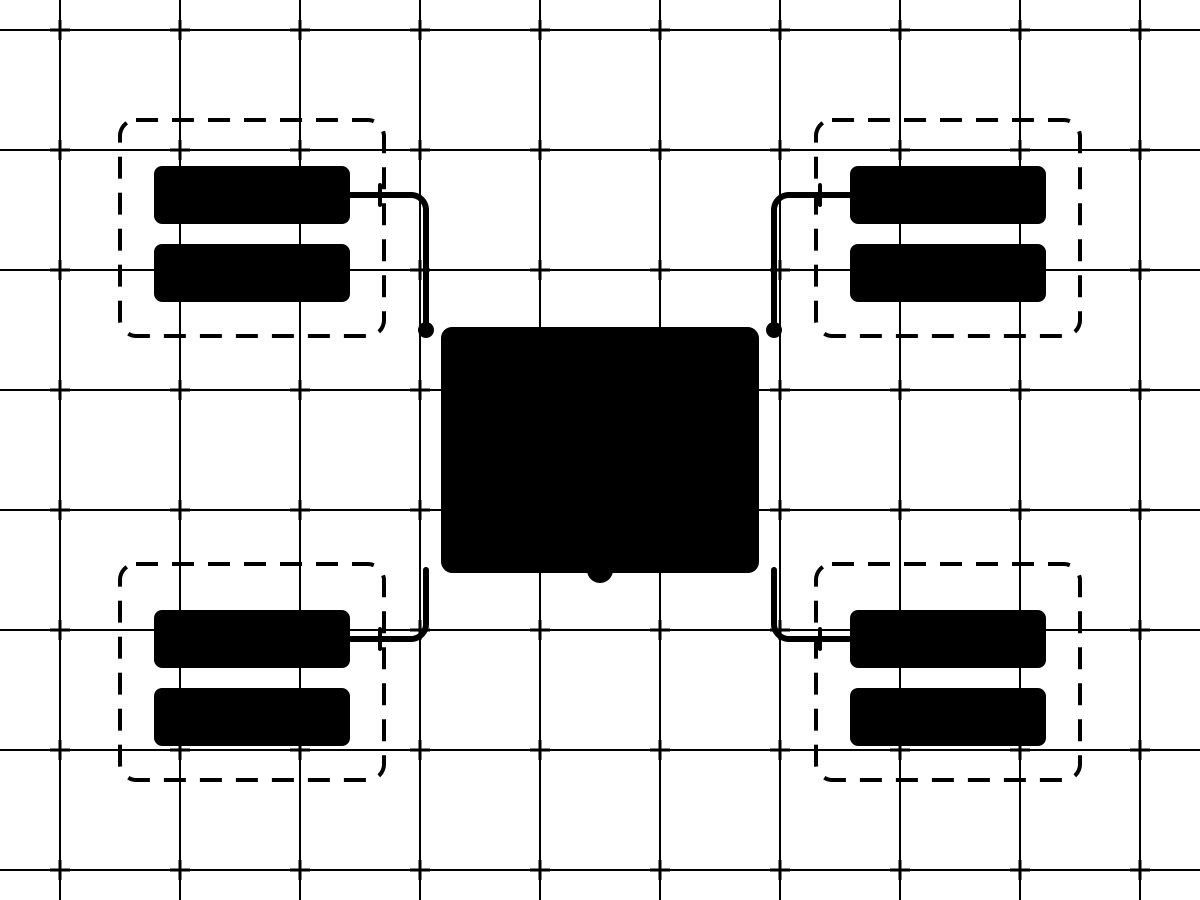
    Four systems each holding a customer record; two versions that disagree pass through one ownership map and come out as the same record on both sides.

    Billing has one version of the customer. HubSpot has another. The field sales app and the ERP each have their own. We map which system owns each fact, which direction the data moves, and what happens when they disagree, then build the connection to that map.

    • API and system architecture
    • Data mapping and synchronization
    • Billing, CRM, sales, and operations connections
    Talk through a connection
  2. Automate the handoff

    Work someone is still doing by hand

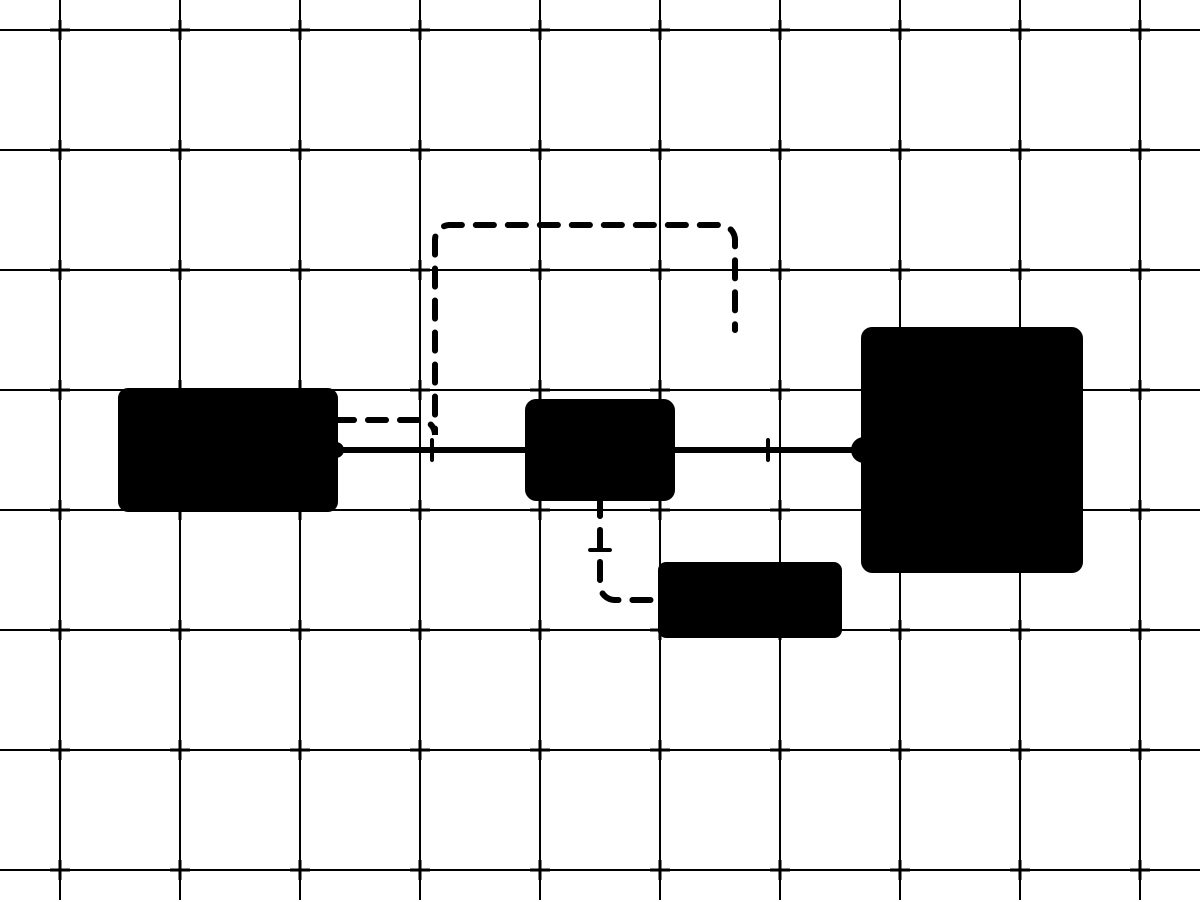
    A record leaves its source along a straight automated route through a validation check into the destination record; the old manual path is drawn dashed above, and a dashed branch leads to a logged holding block for failures.

    Re-keying an order, forwarding a form, updating two records so they match. We build the automation around the moment the work happens, with checks for bad data and a plan for what happens when something fails, so the step stops needing a person.

    • Triggers and workflow automation
    • Data validation and recovery
    • Logging and alerts
    Talk through a workflow
  3. Apply AI carefully

    Repetitive work that needs judgment, not just rules

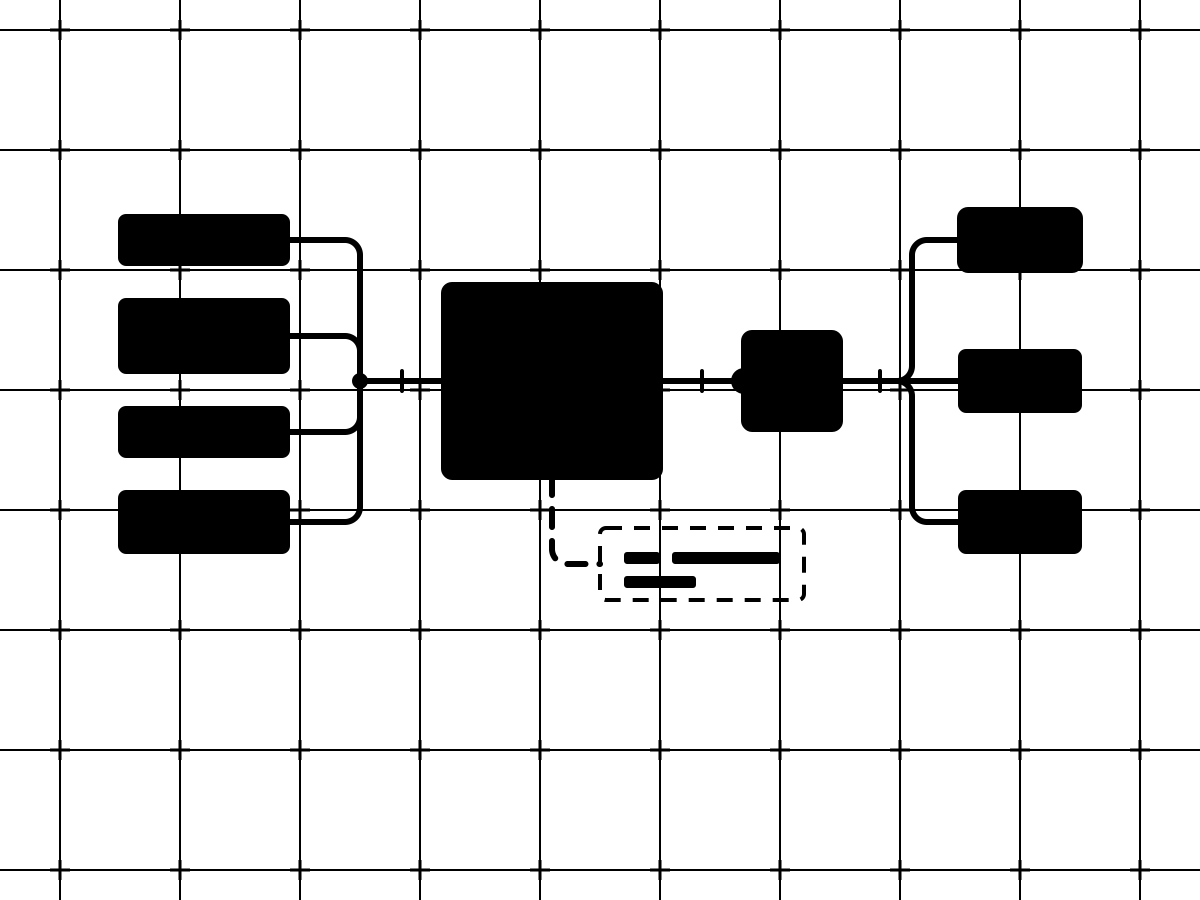
    Unlike inbound items merge into a judgment step, pass a human approval gate, and are routed to three destinations; a dashed path records every decision in an audit ledger.

    Reading an inbound request and routing it. Drafting the first version of a summary. Pulling the useful facts out of a document. Where AI can take that kind of work off a person's plate, we build it in, keep the consequential decisions with your team, and make the results measurable.

    • Workflow and agent design
    • Human approval and audit trails
    • Evaluation and governance
    Talk through an AI workflow

Technology ecosystem

Built on the platforms your operation already runs on.

Revenue, connectivity, business operations, data, and enrollment rarely live in one tool. We build the HubSpot layer that connects platforms like Salesforce, Calix, WordPress, and Slate, with the integration shaped around how your team works.

Also in the stack

  • NISC
  • Sonar
  • CrowdFiber
  • VETRO
  • NetSuite
  • ConnectWise
  • Marketo
  • Postalytics
  • Snowflake
  • Power BI
  • Azure
  • HubSpot
  • Salesforce
  • Calix
  • NISC
  • NetSuite
  • Sonar
  • Postalytics
  • WordPress
  • CrowdFiber
  • VETRO
  • Snowflake
  • Power BI
  • Azure

How an integration engagement runs

Three stages, seven steps. Discovery is part of the engagement.

Services we offer

One version of the customer that billing, sales, service, and operations all agree on. We bring the mapping, connections, automation, and monitoring together.

  1. Plan

    • Tech stack and integration audits
    • Integration roadmaps, with every engagement or on their own
    • Requirements and data mapping with stakeholder sign-off
    • Source-of-truth and data ownership design
  2. Build

    • API and middleware development
    • Data migration and cleanup
    • Workflow automation inside HubSpot and between systems
    • Connections to billing, CRM and marketing, field sales, ERP, and reporting platforms
    • Applied AI systems, scoped to a specific task and documented
    • Data validation, logging, and alerting
    • Testing, deployment, and handover documentation
  3. Grow

    • Monitoring and failure response
    • Maintenance and support for custom integrations
    • Ongoing improvement as systems and business rules change

Relevant proof

What clients say afterward.

They have been thoughtful and purposeful throughout every stage of our implementation. Treating us like teammates rather than a client.
Todd J.Fiber Broadband Association
Proof storyFiber Broadband AssociationHubSpot and Impexium working across membership and operations.Read the work

Choose the next useful step

Find your next move.

Talk through the problem

Connect with our team

Talk through your challenges and see if Second Mile is the right partner to help.

Schedule a conversation

Find the right service

Explore our services

See the evidence

Explore our work

Common questions

When does a custom integration make sense?

When a native connector or an automation platform cannot do the job reliably. We check those first, because they are cheaper to run and easier to maintain. Custom code is the right answer when the data model, the volume, or the business rules need it, and we tell you which case you are in during the roadmap.

Do you build AI into integrations?

Where it removes repeated work that needs judgment rather than just rules: reading and routing a request, drafting a first version, pulling facts out of a document. Consequential decisions stay with your team, every AI step is measurable, and we are not an AI agency; it is one tool inside integration and automation work.

How are security and reliability handled?

Credentials are scoped to what the connection needs and owned by you. Every custom integration validates data on the way in, logs what moves, and alerts someone when something fails. For native integrations, validation, logging, and alerts depend on what the connector offers. We test custom integrations with bad data, duplicate events, and downtime before launch, because those are the conditions under which integrations break.

What determines the scope of an integration?

The number of systems, the number of records and fields that move, whether data flows one way or both, and how the business rules handle disagreement. We map all of that in discovery and scope the first phase to one useful connection. Later connections are your call, made with the first one running.

Who monitors failures after launch?

That is agreed in handover, and it depends on your team. If you have in-house technical staff, we document the monitoring and hand it to them. If you do not, we strongly recommend a small maintenance and support engagement, because connected platforms change and someone has to be watching.

What happens when a connected platform changes its API?

Connected platforms change their APIs, and those changes can require updates to an integration. Our custom integrations include logging and alerts to help make failures visible. API updates can be handled within an ongoing support retainer when there is enough time available. Larger changes are not automatically included in the retainer.

What information and access do you need to start?

The people who own the systems involved, admin or API access to those systems, and examples of the records that have to move. The rest, including the rules for when systems disagree, gets worked out in discovery.