- Format
- Insight
- Topics
- HubSpot for ISPs
Can an ISP Run Its Buy Flow Inside HubSpot?
How a HubSpot-powered buy flow checks the address, shows plans from HubDB, builds the order as a deal, and hands scheduling and payment to billing.
- Written by
- Hannah Collins
- Published
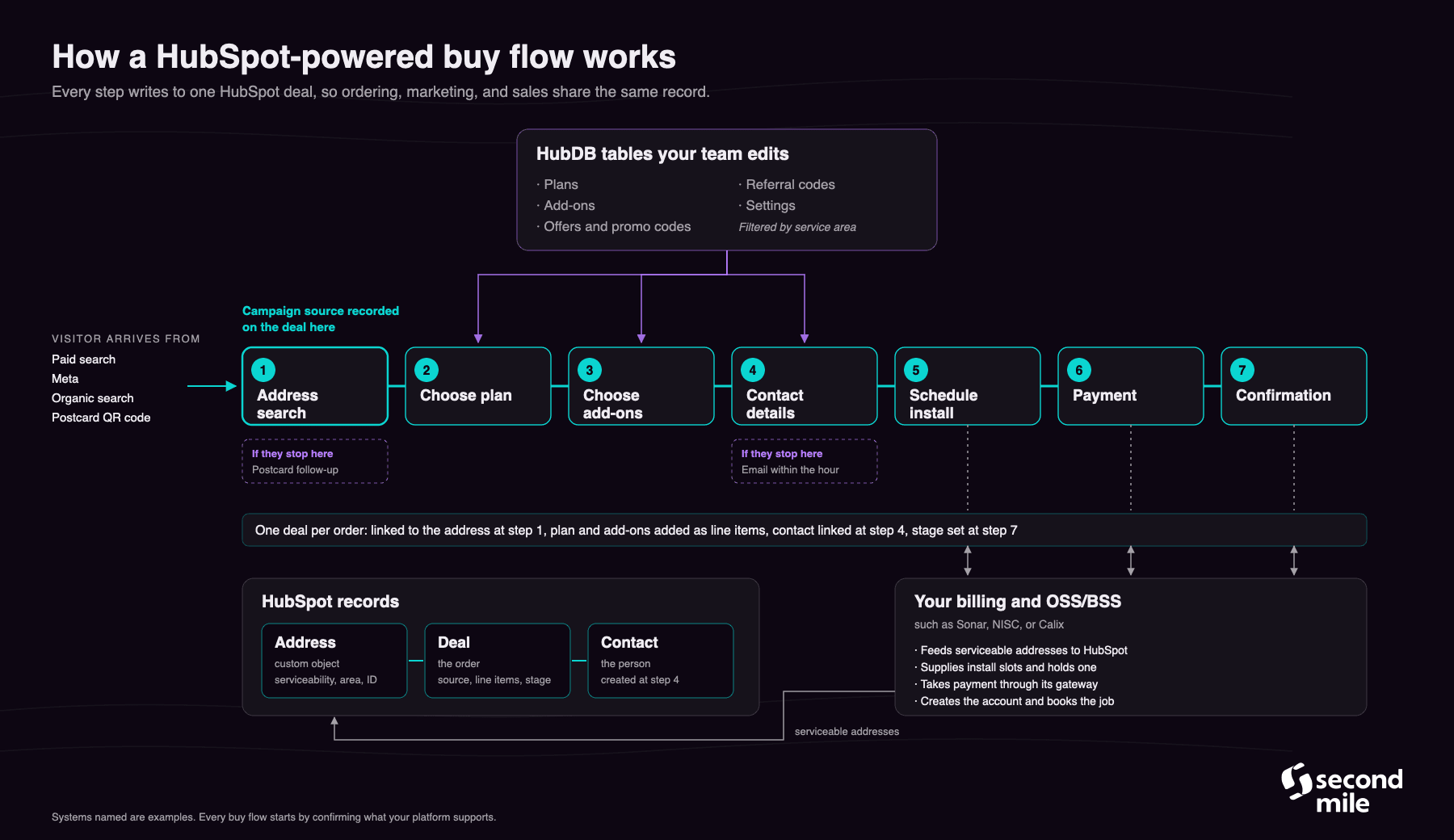
Yes. A HubSpot-powered buy flow checks the address against serviceability data in HubSpot, shows plans and offers from tables your team edits, builds the order as a HubSpot deal one step at a time, and hands scheduling and payment to your billing platform. Ordering, marketing, and sales then share one record for every order.
Most providers sell online through a buy flow that sits apart from everything else. The order happens in one tool, the leads live in another, marketing runs from a third, and someone exports and uploads to keep them in step. A HubSpot-powered buy flow puts the order in the same system as the CRM and the marketing, so the team works from one set of facts and every half-finished order is something a person can act on.
What is a buy flow?
A buy flow is the online path a household or business takes to order internet service: check an address, choose a plan, add extras, give contact details, book an install, and pay. For a provider, it's the storefront, and for most providers it carries a growing share of new orders.
The difference with a HubSpot-powered buy flow is where the order lives while it's being built. Each step writes to HubSpot as it happens, instead of handing HubSpot a finished order at the end, or no order at all.
What happens at each step?
1. Address search. The visitor types an address, and the buy flow checks it against an address record in HubSpot, fed by your OSS/BSS with serviceability and the area the address belongs to. Where the address isn't in HubSpot, the flow can fall back to a map lookup and check it against your service polygons. If it's serviceable, HubSpot creates a deal and links it to the address, and the campaign that brought the visitor in is recorded on that deal. Residential and business visitors can follow different paths from here.
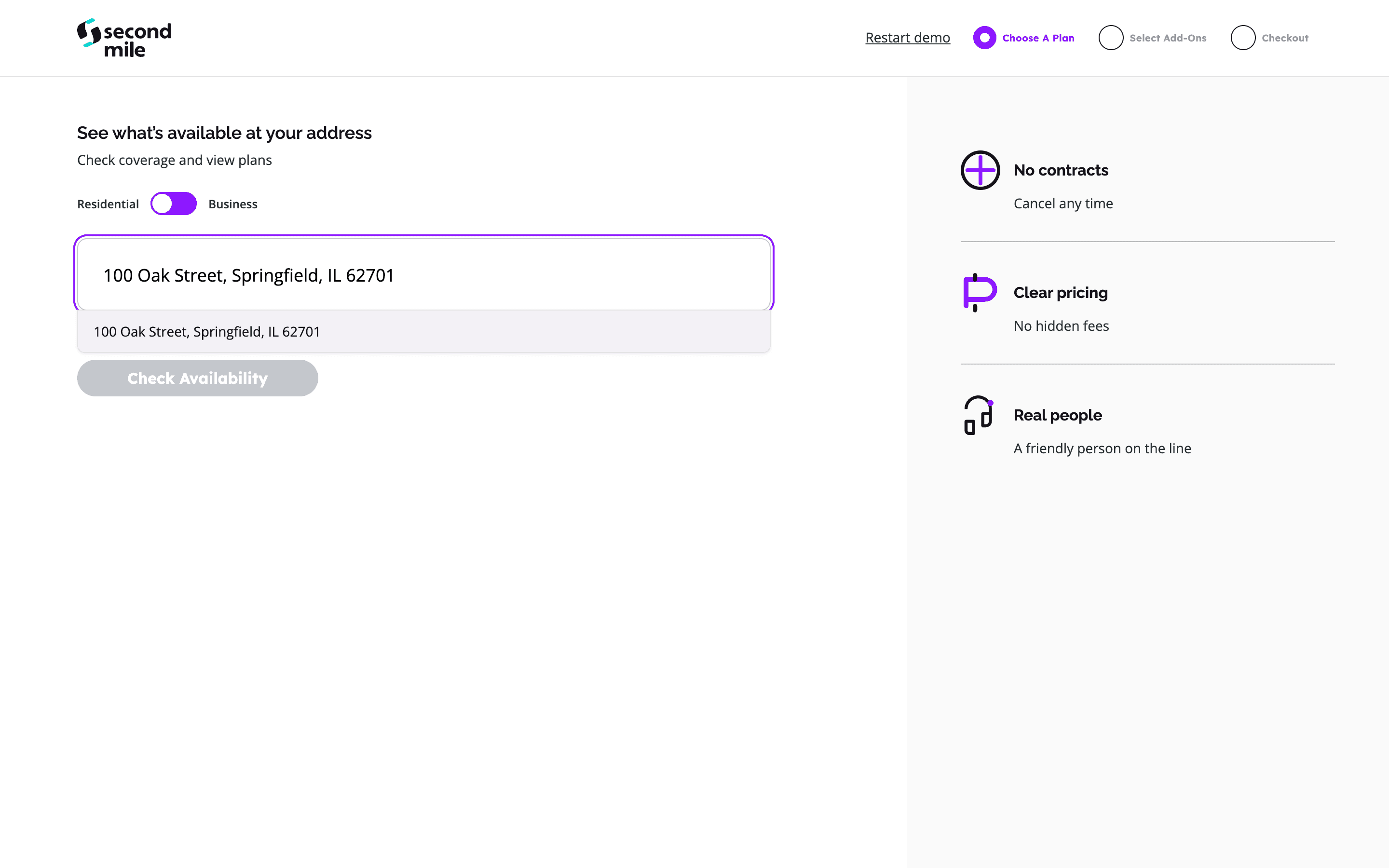
Address search checks availability before the visitor chooses a plan. Demo data.
2. Choose a plan. The plans shown come from a HubDB table, filtered to the area the address sits in, so each market sees its own speeds and prices. The FCC broadband facts label can sit beside each plan. The selected plan is added to the deal as a line item.
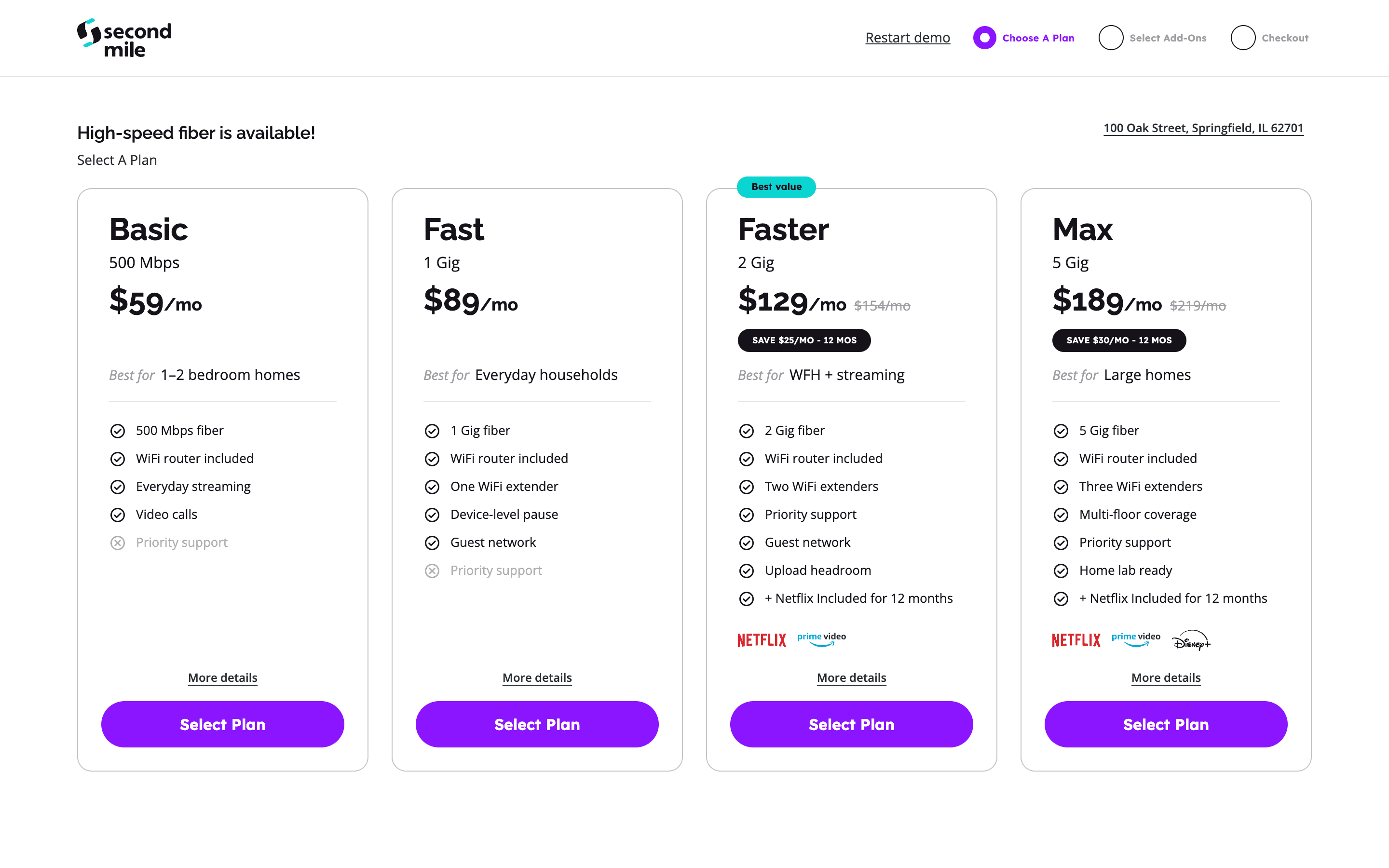
Plan selection shows the available speeds, prices, and promotional offers. Demo data.
3. Choose add-ons. Wi-Fi equipment, home phone, mobile, streaming, and protection plans come from a second table, grouped into categories, and each one lands on the deal as its own line item.
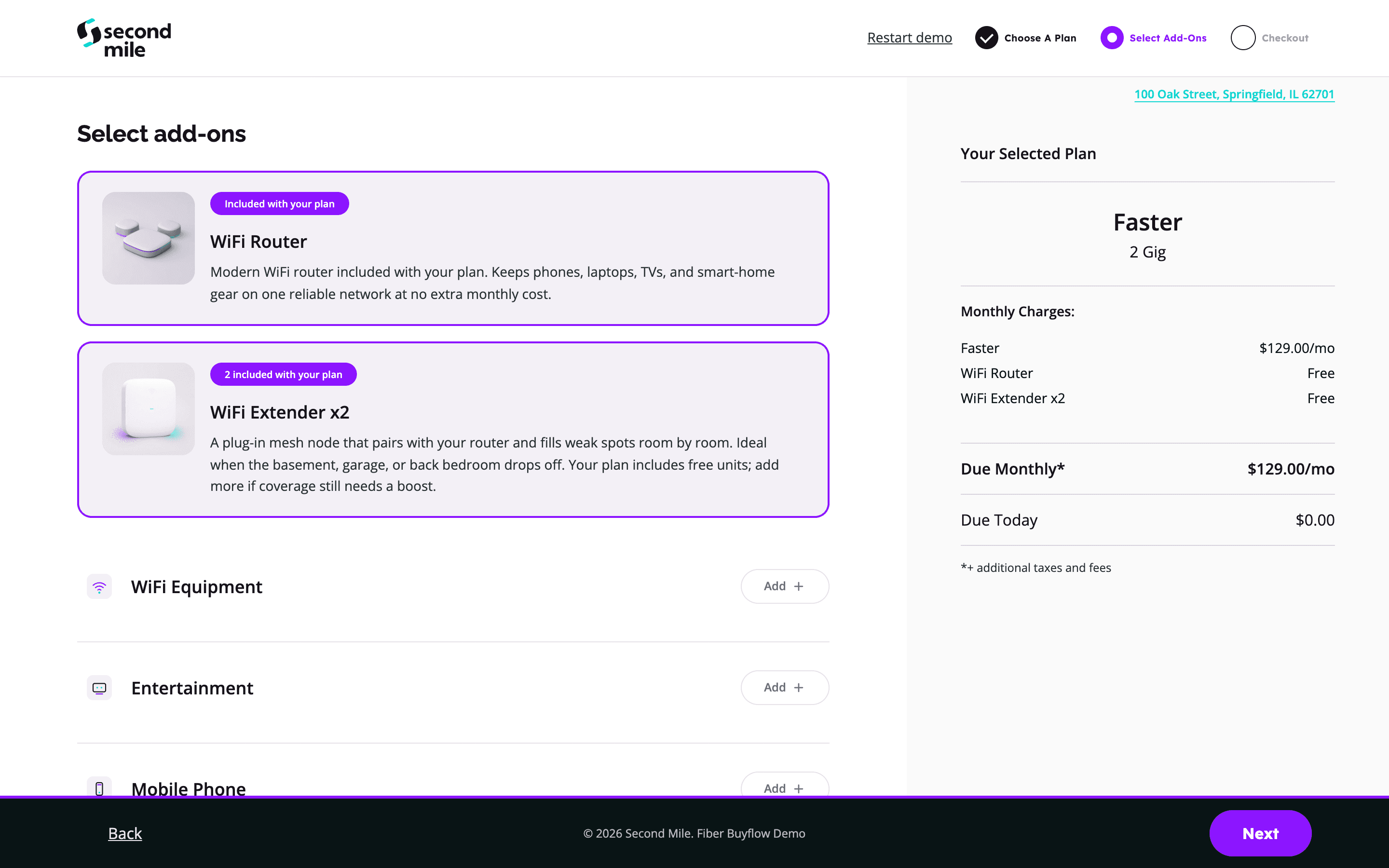
The add-on step shows included equipment and additional product categories alongside the order summary. Demo data.
4. Contact details. Only now does the visitor give a name, an email, and a phone number. HubSpot creates the contact and links it to the deal and the address. This is also where promo codes and referral codes are entered.
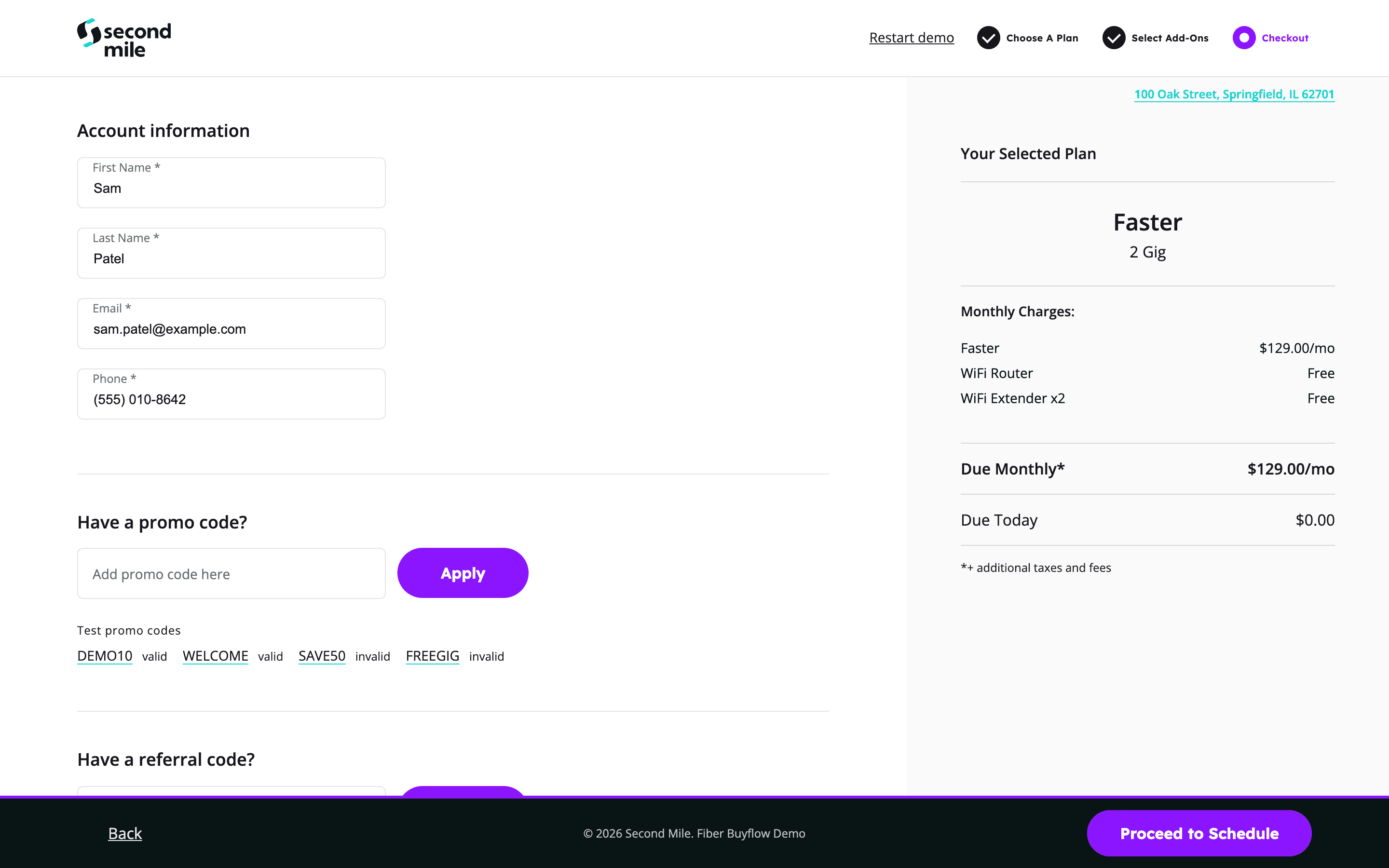
Contact details and promo codes are collected after plan and add-on selection. Demo data.
5. Schedule the installation. The buy flow asks your OSS/BSS for open install slots and holds the one the visitor picks. Nothing is booked until payment goes through.
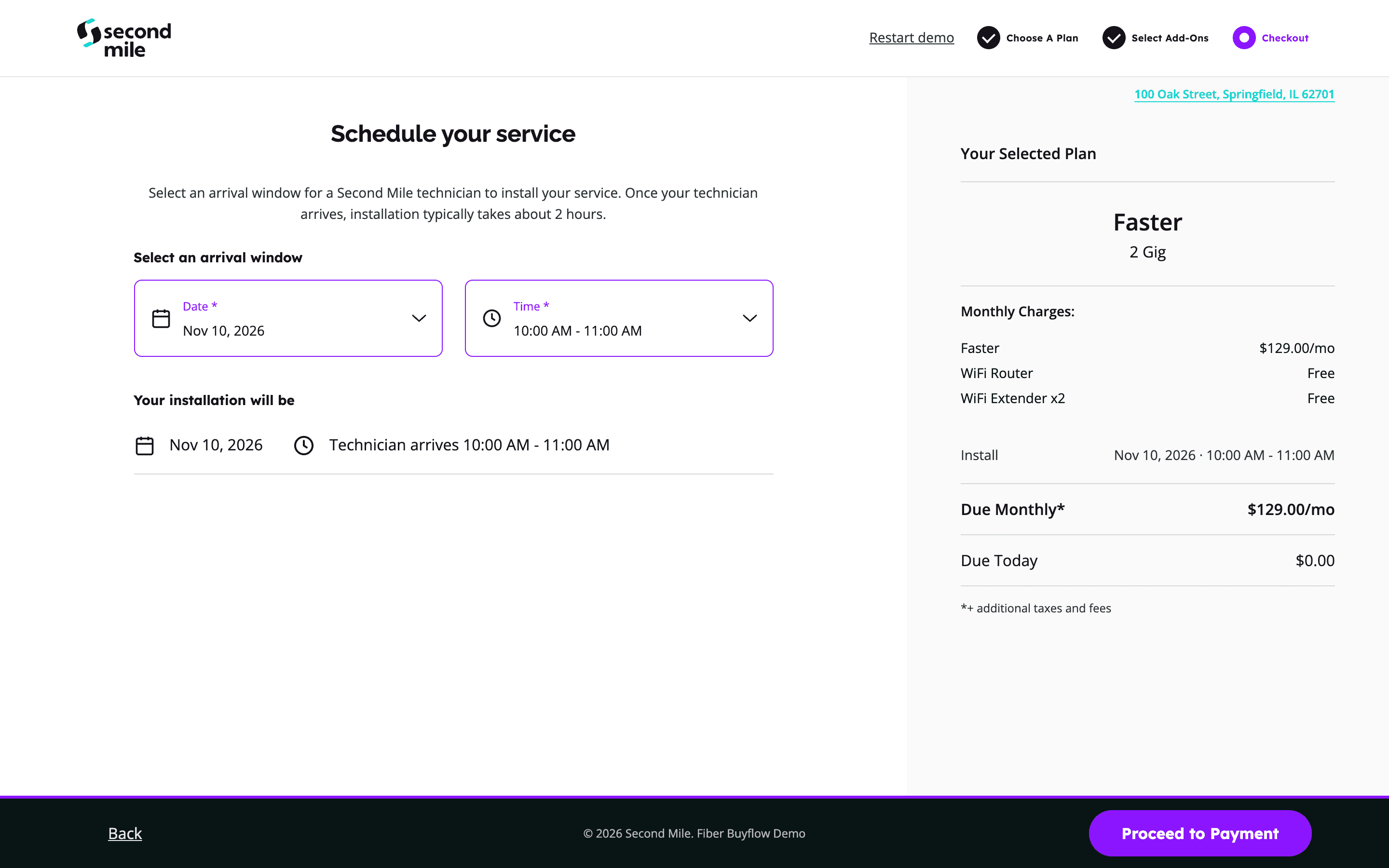
The visitor selects an installation date and arrival window before proceeding to payment. Demo data.
6. Payment. Payment runs through the gateway your billing platform already uses, such as Sonar Pay, Paymentus, or Stripe.
7. Confirmation. The billing platform creates the account, assigns the address, attaches the plan, schedules payment, and books the technician's job. In HubSpot, the deal moves to a sold, install scheduled stage, which is tracked separately from installed, because the gap between the two is where some orders quietly fall away.
How do plans, promotions, and referral codes stay up to date?
They live in HubDB, a set of spreadsheet-style tables inside HubSpot that a web page can read from. A typical buy flow uses one table each for plans, add-ons, offers, promo codes, referral codes, and settings. Each row carries the product's ID from your billing system's catalog, its price, its description and images, and the areas where it's sold.
That gives your marketing team direct control. A new promotion in one neighborhood is a row someone on your team adds that afternoon, with no development cycle in between. Offers display on the plan page itself, like $25 off a month with the old price struck through. Promo codes are entered at checkout and can carry more than a discount: a free install, a price lock for two years, or a gift card. Each code can be allowed or blocked from stacking with an offer, and limited to certain plans or areas.
Pricing can be as granular as the business needs, down to different plans for neighboring buildings. When plans change in bulk, the team exports the table, edits it, and imports it back with the row IDs kept, so nothing duplicates. Where a provider would rather keep plans in the billing system, HubDB can be updated from it automatically instead.
What happens when someone doesn't finish?
Because the deal exists from the first step, every abandoned order is visible, and the follow-up depends on how far the visitor got:
- Stopped after the address search. HubSpot knows the address and nothing else, which is enough for a postcard, and postcards don't need email consent.
- Stopped after contact details. The deal moves to an abandoned cart stage within an hour, and the email follow-up starts, with SMS where there's a phone number and consent.
- Address not serviceable yet. The visitor's interest is recorded against the address, which builds a list of where demand is waiting for the build. A pre-sale workflow can keep those people warm and invite them to order as their address becomes serviceable.
What stays in the billing system?
Your OSS/BSS stays the system of record for the account, the service, billing, and the install schedule. HubSpot holds the story of the order: where it came from, what was chosen, where it stopped, and what marketing and sales did about it.
How much of the flow can run inside HubSpot depends on what your platform allows. Some billing systems let a buy flow read install slots and take payment through an API. Others require scheduling and payment to happen in their own interface, and in that case the HubSpot portion ends at contact details and hands the order over. Our team has built, scoped, or mapped HubSpot integrations with Calix, NISC, Sonar, CrowdFiber, VETRO, eLation, ICOMS, Vision, Compax, AEX, and CHR. Every buy flow we build starts by confirming what your platform supports before anything is promised.
Why build the buy flow in HubSpot?
A standalone buy flow tool can run a good checkout. The trade-off is that the order lives outside the system where marketing and sales work, so follow-up, attribution, and reporting all depend on an integration or an export. Building the buy flow in HubSpot removes that step:
- Every order arrives with its source. The campaign is recorded at the address search, so reporting shows orders by campaign and by market. See how to record campaign attribution at the address search.
- Follow-up runs on its own. Abandoned carts, pre-sale nurture, and install reminders are HubSpot workflows working from the same deal.
- Marketing owns the offers. Plans, promotions, and codes change without a developer, and each one can be tracked to the orders it produced.
What does this look like at a provider?
ALLO Fiber's own developers built its buy flow, and Second Mile architected the HubSpot foundation it runs on: custom objects for addresses and product bundles, a live serviceability lookup, and every order landing in the CRM in near real time. ALLO grew monthly online orders 27% between the buy flow's first and third full month, and 59% of its orders now complete fully self-serve, with no agent involved. Read the ALLO Fiber case study.
Core Fiber came to us asking for marketing automation. Once the systems were mapped, the work grew into a full ecommerce build in HubSpot, the integrations across its platforms, and a review of the whole tech stack. Core's buy flow runs on HubSpot from the address check to the install booking, with a pre-sale workflow that nurtures people as their addresses become serviceable and prompts them to schedule their own installation.
What does it take to build one?
The work starts with a map of how your systems fit together: where addresses come from, whether each one carries a unique ID from your billing system (the street spelling isn't reliable enough to match on), how your service areas are defined, and what your OSS/BSS will let a buy flow read and write. From there the address object and the HubDB tables are built, the steps are designed in your brand, and the integrations for scheduling and payment are connected and tested.
Your team learns to manage the tables, read the reports, and run the follow-up, so the day-to-day stays with the people who know the market. Many providers keep working with us after launch, for new markets, new promotions, and the reports leadership asks for next.
If you're weighing a new buy flow or want to know whether yours could move into HubSpot, connecting with our team is the place to start. You can also see how we work with internet service providers.
Book a meeting with our team →
Frequently asked questions
Does a HubSpot buy flow replace our billing system?
No. The billing platform stays the system of record for accounts, service, payment, and installs. The buy flow builds the order in HubSpot and hands the account, job, and payment to your billing platform at the end.
Which billing and OSS/BSS platforms can a HubSpot buy flow connect to?
Our team has built, scoped, or mapped HubSpot integrations with Calix, NISC, Sonar, CrowdFiber, VETRO, eLation, ICOMS, Vision, Compax, AEX, and CHR. Whether scheduling and payment can run inside the buy flow depends on what each platform's API allows, so every build starts by confirming that.
Can our marketing team change plans and promotions without a developer?
Yes. Plans, add-ons, offers, promo codes, and referral codes live in HubDB tables inside HubSpot. Your team edits a row or imports a spreadsheet, and the buy flow shows the change by area.
Working through a related operating problem? Talk through the architecture.